配信画面でよく見る、チャンネル登録者数の表示。表示をする為に、YouTubeStudioの画面を毎回開いてトリムしているのがよくあるやり方ですが、実はOBSから直接表示させる方法があります。
思っているより簡単に出来るので、是非やってみてください。
チャンネル登録者数のURLを取得する
チャンネル登録者数のURLはYouTubeStudioのアナリティクスから取得する事ができます。URLは通常の配信で利用しているブラウザで、[ YouTubeStudio ] の [ アナリティクス ] にアクセスしてください。
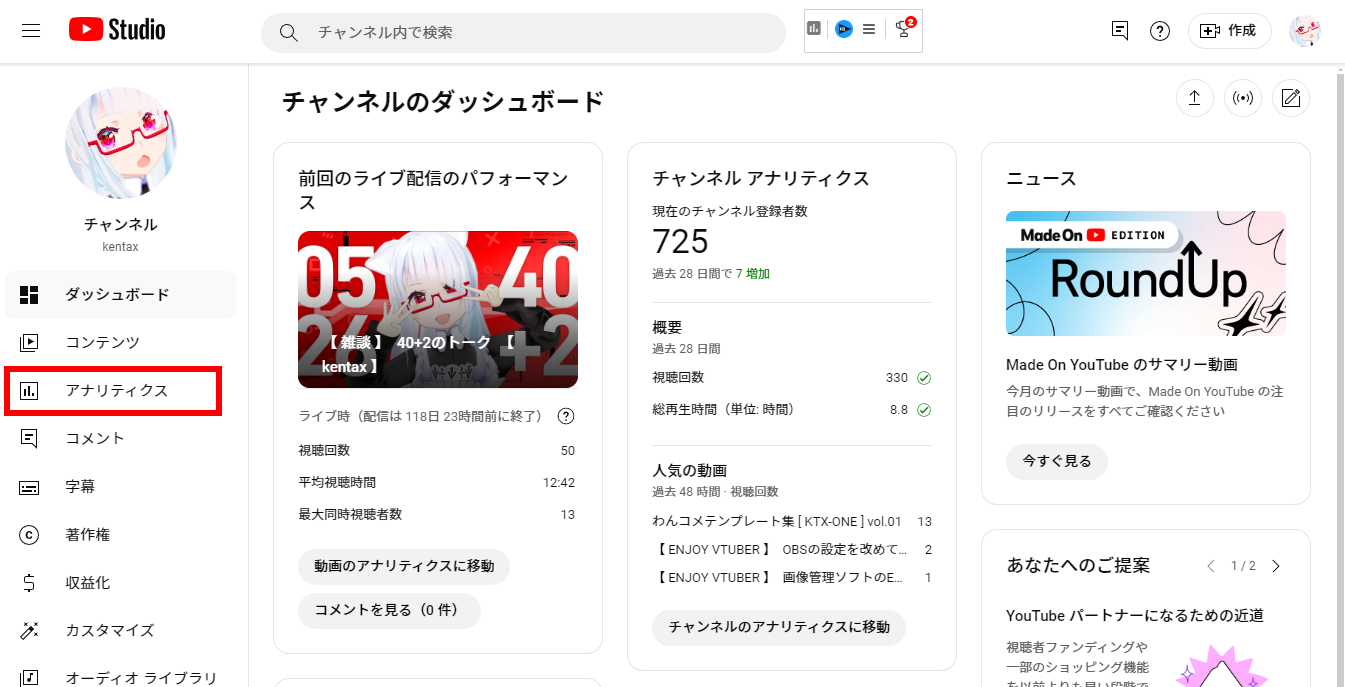
[ アナリティクス ] のページの右側にあるリアルタイム更新のチャンネル登録者数の下の [ 現在の数を表示 ] をクリックします。
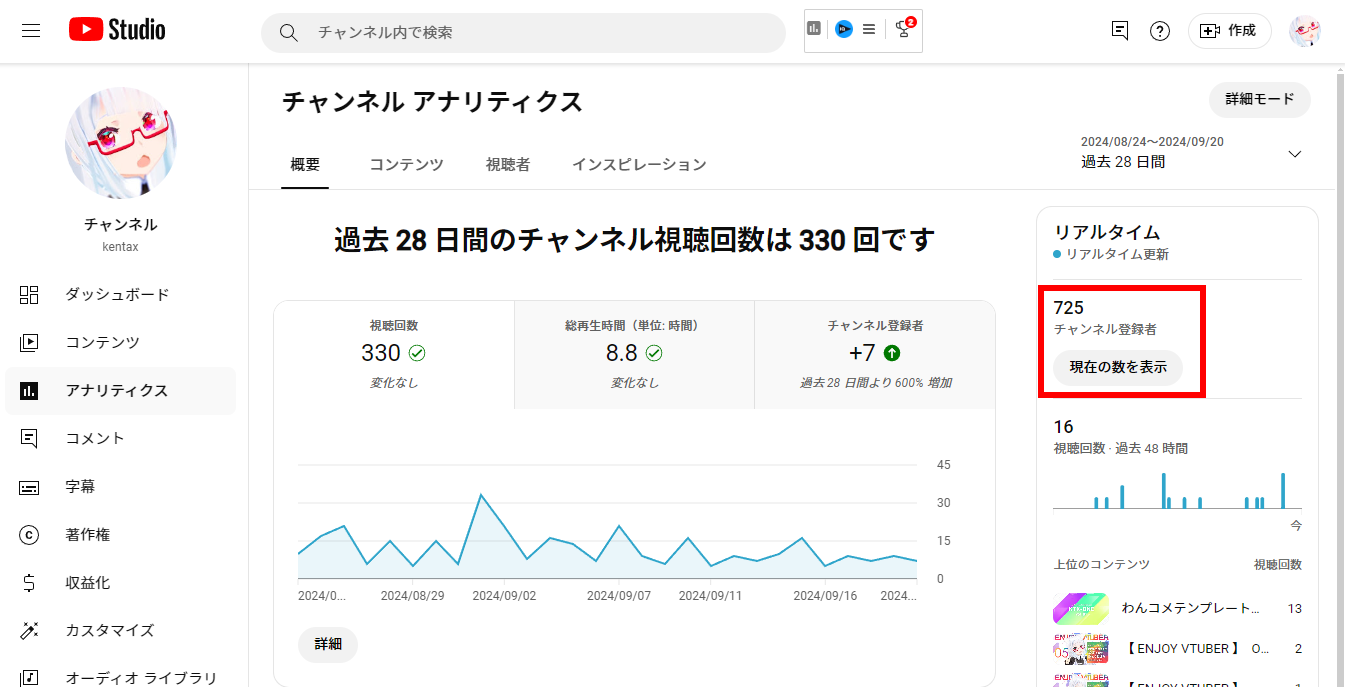
そうすると下記のページが表示がされます。
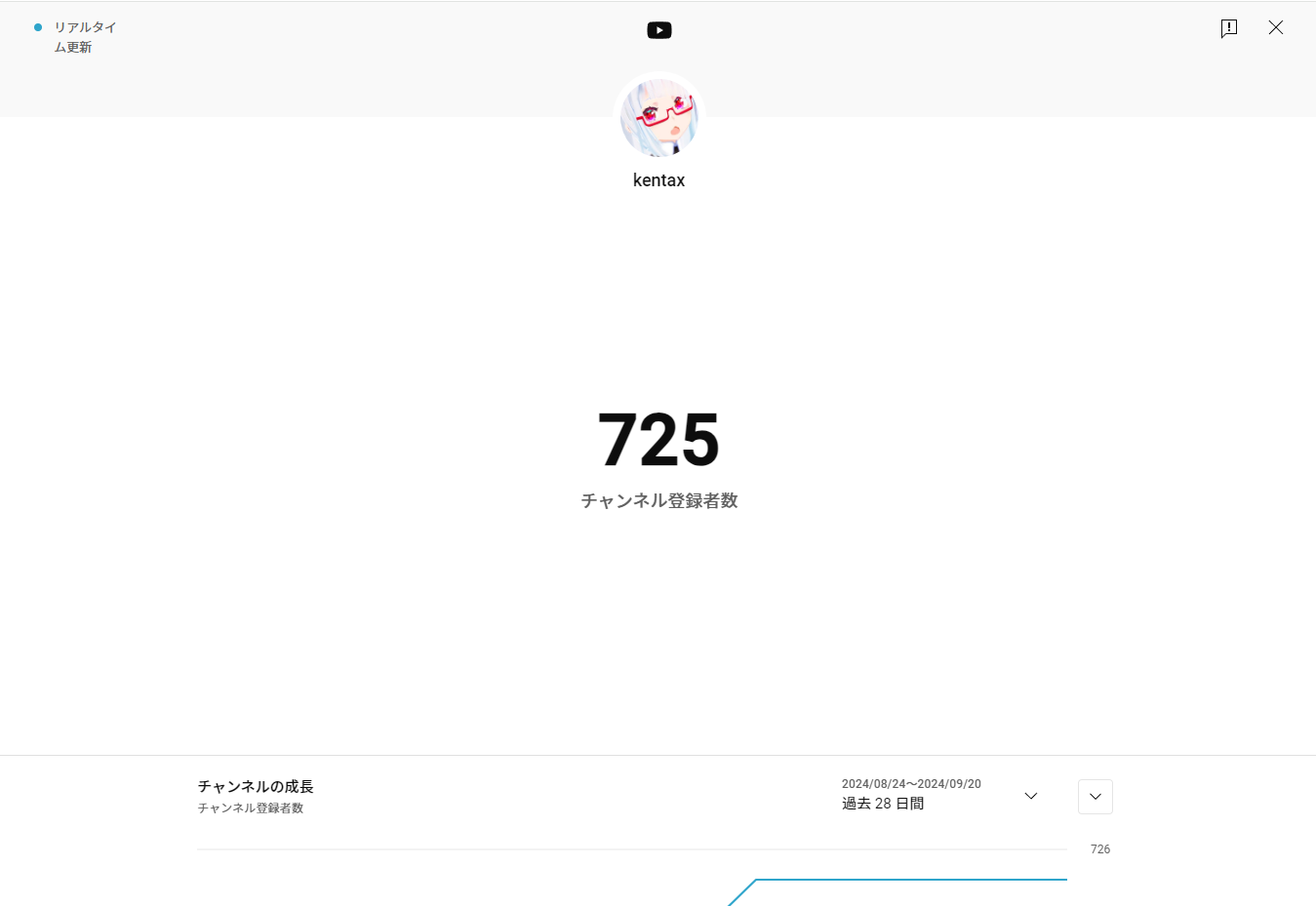
そして、下記の様なURLがアドレスバーに表示されるので、こちらをコピーしておいてください。(チャンネルIDはあなたのチャンネルのIDになります。)
2026年8月26日頃からダークモードだとこのURLにならないようなので、気をつけてください!
https://studio.youtube.com/channel/チャンネルID/analytics/tab-overview/period-default/explore?entity_type=CHANNEL&entity_id=チャンネルID&time_period=4_weeks&explore_type=SUBSCRIBERS
わからない場合は、下記のジェネレーターを使って発行してみてください。
アナリティクスURL ジェネレーター
自分のチャンネルURLを貼るだけで、登録者アナリティクス画面のURLを作ります。
@ハンドルのURL・チャンネルURL・チャンネルIDのどれでもOKです。
生成されたURL
うまくいかないときは
- ハンドル(@から始まるURL)で見つからない場合は、YouTube Studio を開いてください。
- アドレスバーの
studio.youtube.com/channel/UC…の UC… がチャンネルIDです。 - そのURLをまるごと入力欄に貼り付ければ、通信なしで確実に生成できます。
※ 生成されるURLは自分が管理しているチャンネルでのみ開けます(YouTube Studio の画面のため)。
OBSのカスタムブラウザドックでYouTubeにログインする
OBSのカスタムブラウザドックで自分のチャンネルURLににアクセスし、ログインをします。
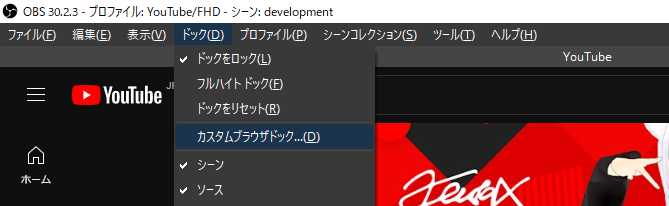
OBSの上部のメニューにある [ ドック ] の中にある [ カスタムブラウザドック ] を選択します。
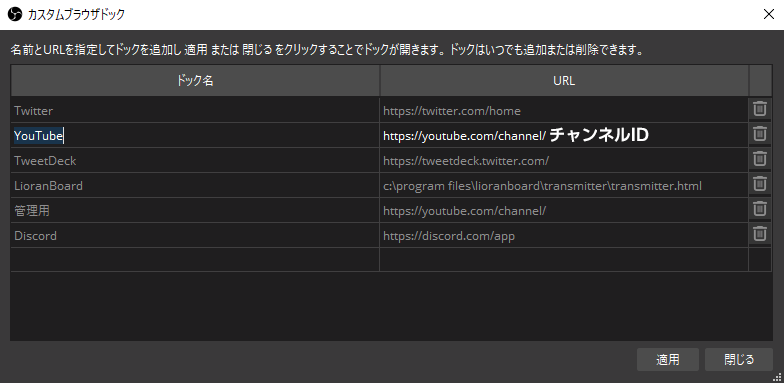
追加すると、YouTubeの画面がでてくるので、通常のブラウザと同じように右上のログインからログインしてください。
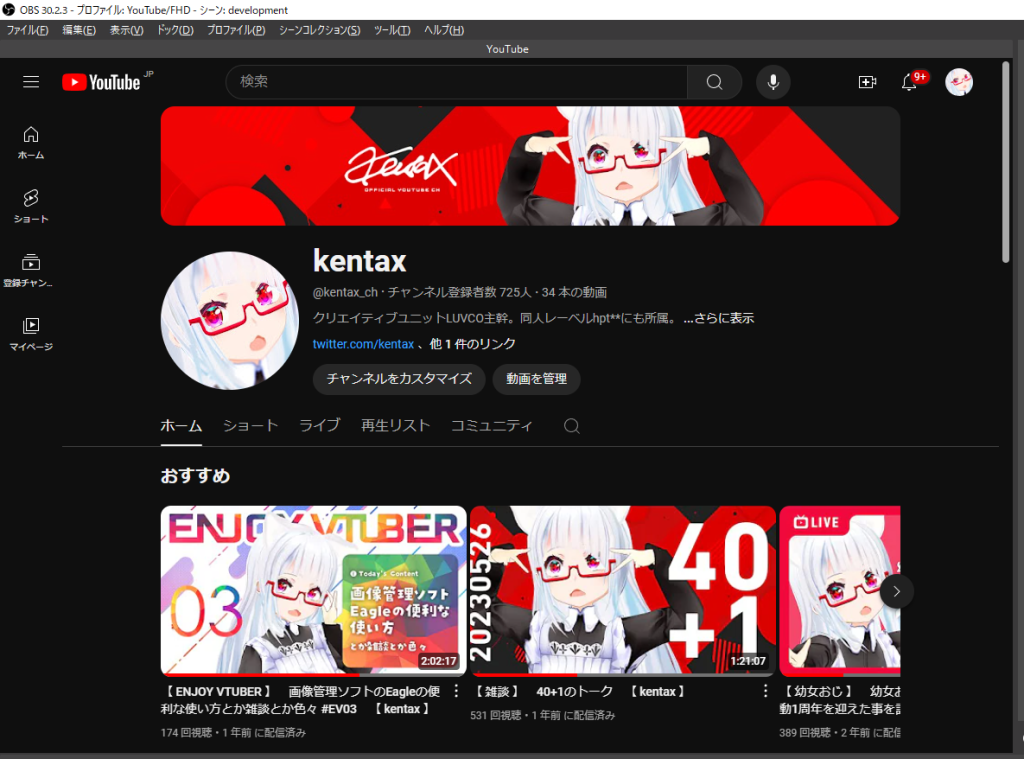
このログインを行う事により、先に取得しているURLもログインした状態になります。
OBSへソースを追加する
ログインが完了した後に、OBSへ[ ブラウザソース ] で先ほど取得したURLを入力します。
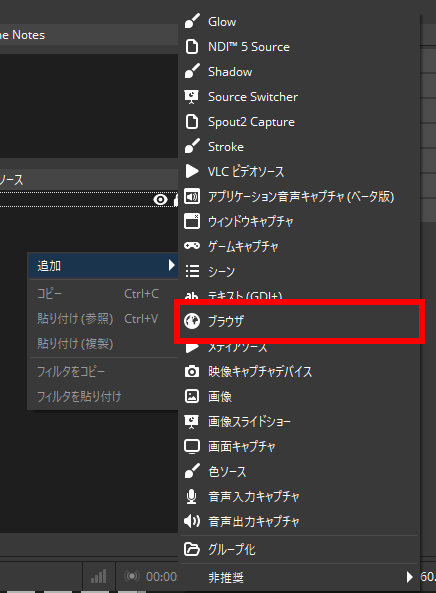
ブラウザの入力画面が表示されたら、下記の様に入力をしてください。
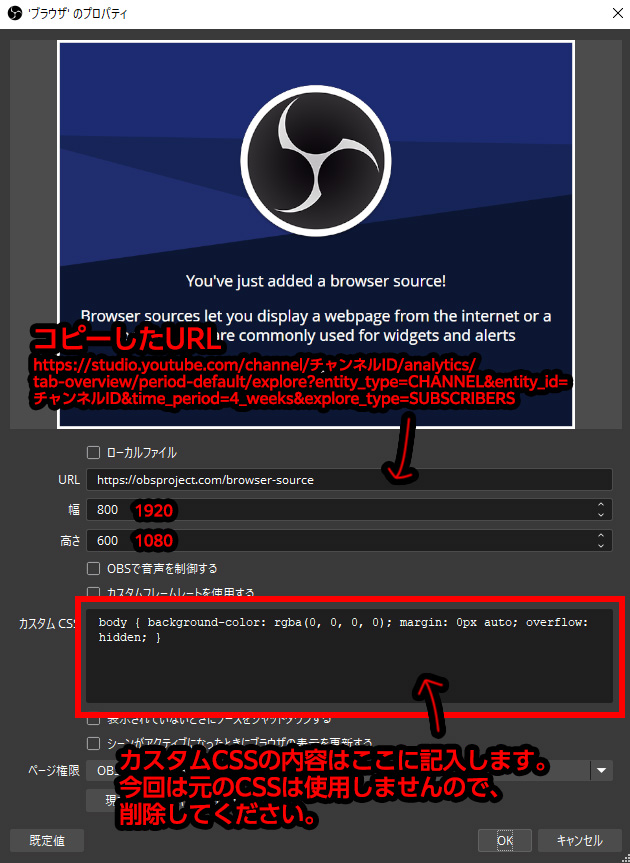
入力するCSS
下記のCSSをカスタムCSSへコピペする事で、表示を好きなものに変更できます。
ソースコードの上にカーソルを持っていくと右側にコピーボタンが表示されるので、そこからコピーしていってください。
html, body { width: 100% !important; height: 100% !important; margin: 0 !important; padding: 0 !important; overflow: hidden !important }
body * { visibility: hidden !important }
yta-explore-dialog, yta-explore-dialog * { visibility: visible !important }
html, body, ytcp-app, #content, #main, tp-yt-paper-dialog, ytcp-dialog, yta-explore-dialog, yta-explore-dialog *, yta-explore-app, yta-explore-page, yta-explore-subscribers, #page-container, #page-inner-container, .content-container, .scrollable, #main-area, #counter-area, #counter { background: transparent !important; background-color: transparent !important; border: none !important; box-shadow: none !important }
yta-explore-dialog *::before, yta-explore-dialog *::after { background: transparent !important }
tp-yt-iron-overlay-backdrop, iron-overlay-backdrop, .ytcp-overlay, .ytcp-dialog-overlay, #dialog-overlay, #scrim, .scrim { display: none !important }
yta-explore-dialog, #main-area { position: fixed !important; inset: 0 !important; width: 100% !important; height: 100% !important; max-width: none !important; max-height: none !important; margin: 0 !important; padding: 0 !important }
#main-area, #counter-area { display: flex !important; align-items: center !important; justify-content: center !important }
#counter-area { width: auto !important; height: auto !important }
#header-rectangle, #channel-title, #subscribers-label, #chart-area, #icon-buttons-right, yta-explore-page > header { display: none !important }
#counter-area > #counter, yta-smooth-counter, yta-smooth-counter > #counter { visibility: visible !important; opacity: 1 !important; max-width: none !important; margin: 0 !important; padding: 0 !important }
::-webkit-scrollbar { display: none !important }カスタマイズする
単色で設置するのも問題ありませんが、可愛いデザインに合わせて変更などもできます。サンプルおいておくので、是非自分の好きな色にして設置してみてください!
シンプルに白文字のCSS
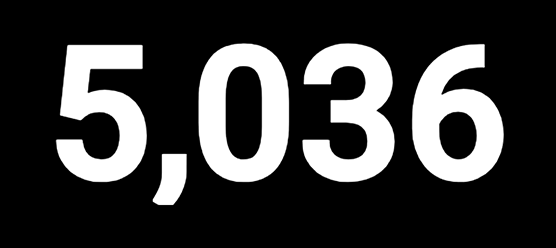
html, body { width: 100% !important; height: 100% !important; margin: 0 !important; padding: 0 !important; overflow: hidden !important }
body * { visibility: hidden !important }
yta-explore-dialog, yta-explore-dialog * { visibility: visible !important }
html, body, ytcp-app, #content, #main, tp-yt-paper-dialog, ytcp-dialog, yta-explore-dialog, yta-explore-dialog *, yta-explore-app, yta-explore-page, yta-explore-subscribers, #page-container, #page-inner-container, .content-container, .scrollable, #main-area, #counter-area, #counter { background: transparent !important; background-color: transparent !important; border: none !important; box-shadow: none !important }
yta-explore-dialog *::before, yta-explore-dialog *::after { background: transparent !important }
tp-yt-iron-overlay-backdrop, iron-overlay-backdrop, .ytcp-overlay, .ytcp-dialog-overlay, #dialog-overlay, #scrim, .scrim { display: none !important }
yta-explore-dialog, #main-area { position: fixed !important; inset: 0 !important; width: 100% !important; height: 100% !important; max-width: none !important; max-height: none !important; margin: 0 !important; padding: 0 !important }
#main-area, #counter-area { display: flex !important; align-items: center !important; justify-content: center !important }
#counter-area { width: auto !important; height: auto !important }
#header-rectangle, #channel-title, #subscribers-label, #chart-area, #icon-buttons-right, yta-explore-page > header { display: none !important }
#counter-area > #counter, yta-smooth-counter, yta-smooth-counter > #counter { visibility: visible !important; opacity: 1 !important; max-width: none !important; margin: 0 !important; padding: 0 !important }
::-webkit-scrollbar { display: none !important }

/* 数字を白文字にする */
yta-smooth-counter .counter-value {
  color: #ffffff !important;
  -webkit-text-fill-color: #ffffff !important;
}
黄色からピンクへのグラデーションにするCSS
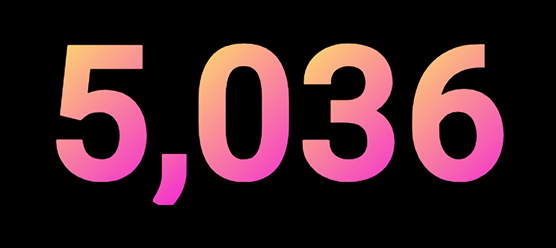
html, body { width: 100% !important; height: 100% !important; margin: 0 !important; padding: 0 !important; overflow: hidden !important }
body * { visibility: hidden !important }
yta-explore-dialog, yta-explore-dialog * { visibility: visible !important }
html, body, ytcp-app, #content, #main, tp-yt-paper-dialog, ytcp-dialog, yta-explore-dialog, yta-explore-dialog *, yta-explore-app, yta-explore-page, yta-explore-subscribers, #page-container, #page-inner-container, .content-container, .scrollable, #main-area, #counter-area, #counter { background: transparent !important; background-color: transparent !important; border: none !important; box-shadow: none !important }
yta-explore-dialog *::before, yta-explore-dialog *::after { background: transparent !important }
tp-yt-iron-overlay-backdrop, iron-overlay-backdrop, .ytcp-overlay, .ytcp-dialog-overlay, #dialog-overlay, #scrim, .scrim { display: none !important }
yta-explore-dialog, #main-area { position: fixed !important; inset: 0 !important; width: 100% !important; height: 100% !important; max-width: none !important; max-height: none !important; margin: 0 !important; padding: 0 !important }
#main-area, #counter-area { display: flex !important; align-items: center !important; justify-content: center !important }
#counter-area { width: auto !important; height: auto !important }
#header-rectangle, #channel-title, #subscribers-label, #chart-area, #icon-buttons-right, yta-explore-page > header { display: none !important }
#counter-area > #counter, yta-smooth-counter, yta-smooth-counter > #counter { visibility: visible !important; opacity: 1 !important; max-width: none !important; margin: 0 !important; padding: 0 !important }
::-webkit-scrollbar { display: none !important }

/* 数字のグラデーション */
yta-smooth-counter .counter-value {
  color: transparent !important;
  background: linear-gradient(
    135deg,
    #ffec61,
    #f321d7
  ) !important;
  background-clip: text !important;
  -webkit-background-clip: text !important;
  -webkit-text-fill-color: transparent !important;
}
黄赤紫青のグラデーションにするCSS
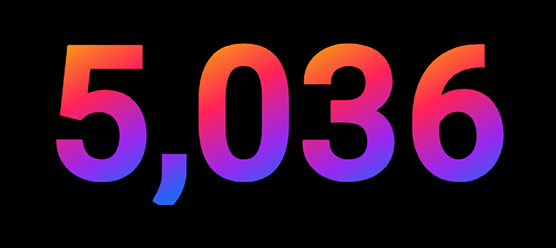
html, body { width: 100% !important; height: 100% !important; margin: 0 !important; padding: 0 !important; overflow: hidden !important }
body * { visibility: hidden !important }
yta-explore-dialog, yta-explore-dialog * { visibility: visible !important }
html, body, ytcp-app, #content, #main, tp-yt-paper-dialog, ytcp-dialog, yta-explore-dialog, yta-explore-dialog *, yta-explore-app, yta-explore-page, yta-explore-subscribers, #page-container, #page-inner-container, .content-container, .scrollable, #main-area, #counter-area, #counter { background: transparent !important; background-color: transparent !important; border: none !important; box-shadow: none !important }
yta-explore-dialog *::before, yta-explore-dialog *::after { background: transparent !important }
tp-yt-iron-overlay-backdrop, iron-overlay-backdrop, .ytcp-overlay, .ytcp-dialog-overlay, #dialog-overlay, #scrim, .scrim { display: none !important }
yta-explore-dialog, #main-area { position: fixed !important; inset: 0 !important; width: 100% !important; height: 100% !important; max-width: none !important; max-height: none !important; margin: 0 !important; padding: 0 !important }
#main-area, #counter-area { display: flex !important; align-items: center !important; justify-content: center !important }
#counter-area { width: auto !important; height: auto !important }
#header-rectangle, #channel-title, #subscribers-label, #chart-area, #icon-buttons-right, yta-explore-page > header { display: none !important }
#counter-area > #counter, yta-smooth-counter, yta-smooth-counter > #counter { visibility: visible !important; opacity: 1 !important; max-width: none !important; margin: 0 !important; padding: 0 !important }
::-webkit-scrollbar { display: none !important }

/* 数字のグラデーション */
yta-smooth-counter .counter-value {
  color: transparent !important;
  -webkit-text-fill-color: transparent !important;

  background-image: linear-gradient(
    150deg,
    rgba(247, 166, 12, 1) 10%,
    rgba(255, 34, 87, 1) 40%,
    rgba(154, 39, 238, 1) 68%,
    rgba(35, 102, 247, 1) 90%
  ) !important;

  background-clip: text !important;
  -webkit-background-clip: text !important;
}
カウンターの数字を大きくする
カウンターのサイズを変更する場合は、カスタムCSSの最後に、以下のCSSを追加してください。
/* カウンターの大きさ */
#counter-area,
#counter-area > #counter,
yta-smooth-counter {
    zoom:1.5;
}
数字を少しでも楽しむために
チャンネル登録者数の増減で気分も上下してしまうものですが、できるだけ楽しく見ていられるものにしておいて、配信中、楽しい気分でいられるようにしましょう。